AI TOOL / #07222
ReadImage
Extract, edit, and copy text from images on web pages.
Introduction
Extracts, edits, and copies text from images on web pages.
What is Image Text Extractor ai chrome extension/plugin?
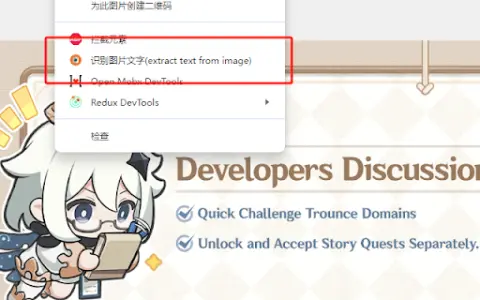
This extension allows users to extract text from images displayed on web pages. It supports common image formats such as jpg, jpeg, png and bmp. After extraction, the text can be edited and copied.
How to use Image Text Extractor ai chrome extension/plugin?
Hover your mouse over the image, right-click and select "Extract text from image". Press "Ctrl + Q" to view the extracted text on the extension page, where it can be edited and copied.
Image Text Extractor ai chrome extension/plugin core features
Extract text from images on web pages
Edit extracted text
Copy extracted text
Edit extracted text
Copy extracted text
Related
Beyond Meet for Google Meet
The Google Meet extension enhances the meeting experience with AI features, boosting productivity and engagement.
Free Accounting Software by SlickPie
Free online accounting software designed for small businesses and freelancers.
Longist
An application that uses AI to determine the impact of food on lifespan, measured in minutes.
CopyrightShark
Provide content creators with services for protecting their content and removing any instances of DMCA violations.
PDFgear
Free PDF software for editing, converting, and managing PDF documents.
PhotoSolve – Scan & Solve Any Question
A Chrome extension designed for instant problem-solving, utilizing AI and OCR technologies.