AI TOOL / #06524
Speak based on Azure Speech
Text-to-speech extension using Azure Speech with support for multiple languages and Chrome live subtitles.
Introduction
Text-to-speech extension using Azure Speech, supports many languages and Chrome Live Caption.
What is Azure Speech TTS Extension ai chrome extension/plugin?
This is a text-to-speech (TTS) extension that leverages the Azure Speech service to convert selected text to audio. It supports multiple languages and integrates with Chrome's Live Subtitles feature for enhanced accessibility. Users need to configure the extension using their Azure Speech Service API key to enable TTS functionality.
How to use Azure Speech TTS Extension ai chrome extension/plugin?
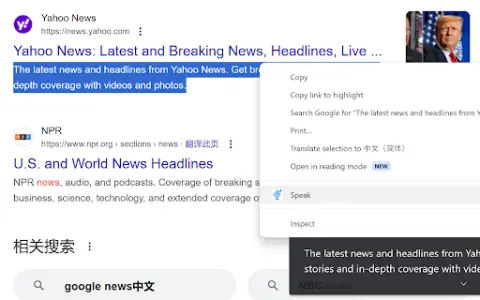
Install the extension, configure it with your Azure Speech Service API key, select text on a web page, and use the extension to play audio for the selected text. Audio playback will be based on the selected language and voice settings.
Core features of Azure Speech TTS Extension ai chrome extension/plugin
Text-to-speech using Azure Speech Service
Support multiple languages
Integrate with Chrome Live Subtitles
Configurable voice settings
Support multiple languages
Integrate with Chrome Live Subtitles
Configurable voice settings
Related
Video To Blog
AI tools convert videos into SEO-optimized blog posts with images and links.
Text to Speech (TTS) Read Aloud Voice Reader by Audeus
A text-to-speech app with realistic sounds to boost productivity.
AIChatOne – Your AI Copilot powered by ChatGPT
The all-powerful GPT-4 artificial intelligence assistant supports a variety of LLMs and enhanced features.
Voicebiometric
Voicebiometric enables real-time subtitles and speaker recognition for live demonstrations.
Notebook Digitizer
By leveraging artificial intelligence and computer vision, the gap between analog and digital note-taking can be bridged.
Talk GPT
GPT-enabled voice chat extension with speech-to-text, text-to-speech, and conversation enhancements.