AI TOOL / #06218
Talk with GPT Extensions
A Chrome extension for conversing with OpenAI's GPT-3 via voice or text.
Introduction
Chrome extension for conversing with OpenAIs GPT-3 using voice or text.
What is the Talk-with-GPT AI Chrome extension/plugin?
Chat with GPT is a Chrome extension that allows users to converse with OpenAI's latest language model AI. It enables a natural and engaging chat experience through voice or text input. The extension leverages Chrome's speech synthesis and text recognition features to provide a seamless conversational experience with the AI.
How do I use the Talk-with-GPT AI Chrome extension/plugin?
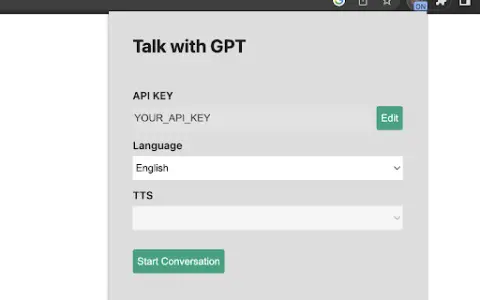
1. Get an OpenAI API key. 2. Open the extension popup. 3. Register the API key. 4. Select a language if needed. 5. Click the “Start Conversation” button. 6. In the pop-up window, click the “Click to Speak” button to start the conversation.
Core features of the Talk-with-GPT AI Chrome extension/plugin
Voice and text conversations with GPT-3
Using Chrome's speech synthesis and text recognition
A simple and intuitive user interface
Using Chrome's speech synthesis and text recognition
A simple and intuitive user interface
Related
superwhisper
An AI-powered offline speech-to-text application that supports over 100 languages.
Xpeacho
An AI text-to-speech platform for video creators, offering human voiceovers.
Solvely AI
Solvely is an online math and homework problem solving tool using AI and image recognition.
Speech to Text
A Chrome extension that allows users to create notes with customizable backgrounds and fonts, either by using voice commands or by typing text.
TeleWizard
An AI call center with human-like conversational capabilities, providing 24/7 multilingual customer support.
VideoVoice
AI-powered tools for podcast management and audio cleanup.