AI TOOL / #06171
Patsa – AI-powered Meeting Copilot
A Chrome extension that enables real-time transcription and AI-powered Q&A during online meetings.
Introduction
Chrome extension for real-time transcription and AI-powered Q&A during online meetings.
What is the Patsa AI Chrome extension/plugin?
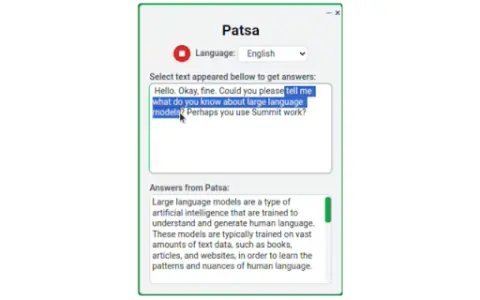
Patsa is a Chrome browser extension designed to enhance online meetings on platforms such as Google Meet, Zoom, and Teams. It transcribes other participants’ speech in real time and lets users select transcribed text to ask AI questions, providing instant information and answers.
How do I use the Patsa AI Chrome extension/plugin?
1) Launch the Patsa extension in any online meeting in Chrome. 2) Click the "Start Transcribing" button to transcribe what the other participants are saying. 3) Select the transcript text you want to ask the AI about, and you'll receive an instant response from the AI.
Core features of the Patsa AI Chrome extension/plugin
Real-time transcription of participants’ speech
AI Q&A based on transcribed text
AI Q&A based on transcribed text
Related
Deep English
Deep English helps English learners achieve fluency through interactive courses and exercises.
PodScribe.IO
PodScribe.IO transforms podcasts into actionable knowledge through AI-powered transcription and analysis tools.
Gnbly
An AI assistant used for handling phone calls, making reservations, providing customer service, and evaluating the potential suitability of new customers.
Treato – Your personal transcriber
An AI Chrome extension designed for medical professionals, offering voice-to-text transcription and translation capabilities.
Allinpod
AI-powered voice generation tools assist content creators in producing engaging audio and video materials.
Video Translator – Translate Video online
Video translation powered by artificial intelligence, supporting over 21 languages and featuring high accuracy.