AI TOOL / #04050
AI Roundtable
Ask a question and receive answers from multiple AI assistants.
Introduction
Ask one question, get answers from multiple AI assistants.
What is a Multiple AI Assistants Chrome extension/plug-in?
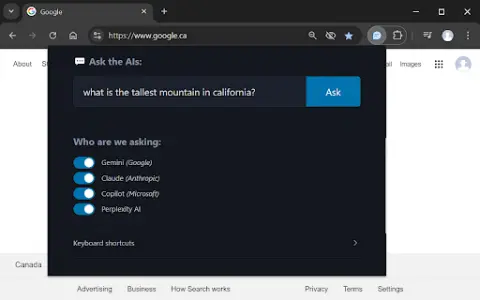
This website allows users to submit questions at once and receive answers from multiple AI assistants. Users can customize which assistant they want to use for their queries. The website also provides keyboard shortcuts, making it easy to access various functions quickly.
How to use the Multiple AI Assistants Chrome extension?
Use the shortcut keys Ctrl/Cmd + Shift + Q to open the query window and start typing your question. Use Alt + 1 to switch to Gemini, Alt + 2 to switch to Claude, Alt + 3 to switch to Copilot, and Alt + 4 to switch to ChatGPT.
The core functions of various AI Assistant extensions/plugins for Chrome.
Query multiple AI assistants simultaneously
It is possible to customize the selection of AI assistants.
Convenient and fast keyboard shortcuts
It is possible to customize the selection of AI assistants.
Convenient and fast keyboard shortcuts
Related
Ask My Book
An AI experiment was used to answer questions related to the book “Minimalist Entrepreneurs”.
FlashFeed
AI-powered news applications that provide fast, personalized summaries and audio updates.
MentorsHQ
An online platform that connects technology professionals with experienced mentors to provide assistance with career guidance.
Auribus
An artificial intelligence-driven platform for hearing training and rehabilitation.
Website Summarizer
A Chrome extension that uses the Gemini API to generate summaries of web pages and allows interaction with AI chatbots.
COACH by CareerVillage
AI-powered career coach offering career exploration, skill development, and job search preparation activities.