AI TOOL / #03900
AiAsk Summary
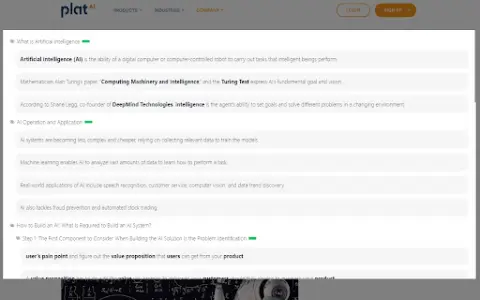
A Chrome extension tool that extracts article outlines to improve reading and research efficiency.
Introduction
Chrome extension that extracts outlines from articles for enhanced reading and research.
What is the AiAsk Summary AI Chrome extension/plugin?
AiAsk Summary is a Chrome extension designed to enhance your reading and research experience. It cleverly extracts the main outline of any article you browse, providing a structured overview of its content.
How do I use the AiAsk Summary AI Chrome extension/plugin?
1. Browse: Open any article in the Chrome browser.
2. Activate: Click the icon in the browser toolbar or the icon on the right side of the page.
3. Extract: This extension analyzes the article and displays a concise outline.
2. Activate: Click the icon in the browser toolbar or the icon on the right side of the page.
3. Extract: This extension analyzes the article and displays a concise outline.
Core features of the AiAsk Summary AI Chrome extension/plugin
Automatic outline generation
User-friendly interface
Improve reading efficiency
Supports YouTube videos
Show detailed content when the outline is ready.
User-friendly interface
Improve reading efficiency
Supports YouTube videos
Show detailed content when the outline is ready.
Related
NewsBang
An AI-powered news platform that provides summaries, insights, and interactive podcasts.
Savage Coach
The first chatbot based on Greg Savage's teaching content, connected directly to your Savage Academy account.
Studia AI
Studia AI: Uses AI to generate personalized video courses based on a single input prompt.
New ElevenLabs Real-time Translation Service
Real-time simultaneous voice translation
AI Math Solver
An AI-based mathematical solver that provides step-by-step solutions and image recognition capabilities.
VPT.FIT
An AI-based fitness platform offering customized workout plans and expert coaching.