AI TOOL / #03007
Design My Room
Let AI-generated designs help you redesign your room in just a few seconds.
Introduction
Redesign your room in seconds with AI-generated designs from a single photo.
What is “Design My Room”?
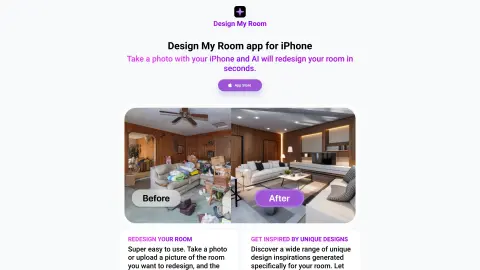
The “Design My Room” app allows you to completely redesign your room in just a few seconds, all by taking a single photo. Simply take a picture of your room, and the iPhone app will provide you with 5 different design options. It’s extremely easy to use: just take a photo or upload an image of the room you want to redesign, and the app will generate 5 unique design ideas. Discover a range of creative designs specifically tailored for your room – let this app inspire your home renovation project!
How to use Design My Room?
Use your iPhone to take photos of the room, or upload existing images. The app will generate five different design ideas for your room.
The core functions of Design My Room
Redesigned rooms powered by AI
For each photo, 5 different design options are generated.
Easy photo upload
Unique design inspiration
For each photo, 5 different design options are generated.
Easy photo upload
Unique design inspiration
Related
Buzzli
An AI-driven tool for creating and automating LinkedIn content.
RoomGPT
Tool to redesign rooms from photos using artificial intelligence.
Backflip AI
Backflip AI offers 3D AI tools to accelerate CAD and 3D modeling workflows.
Capsule
An AI-powered video editor designed to enable quick, collaborative video creation that reflects a brand’s unique identity.
Outreach Optimization on LinkedIn & Gmail
LeadSpot enhances LinkedIn-based prospecting efforts by leveraging contact information collection, as well as CRM and AI-powered messaging features.
Asistee
Virtual assistant services designed specifically for operational needs and specialized tasks.